
If you’re experiencing Google Ads connection issues or would like to reconnect your Google account, removing the existing permission and connecting again often resolves the problem.
Follow the steps below:
Step 1: Open Google Account Connections
Go to:
https://myaccount.google.com/connections
Or navigate manually:
Google Account → Security → Your connections to third-party apps & services
Step 2: Find Netlyze – Profit Tracking
Under Linked apps, locate:
Netlyze – Profit Tracking
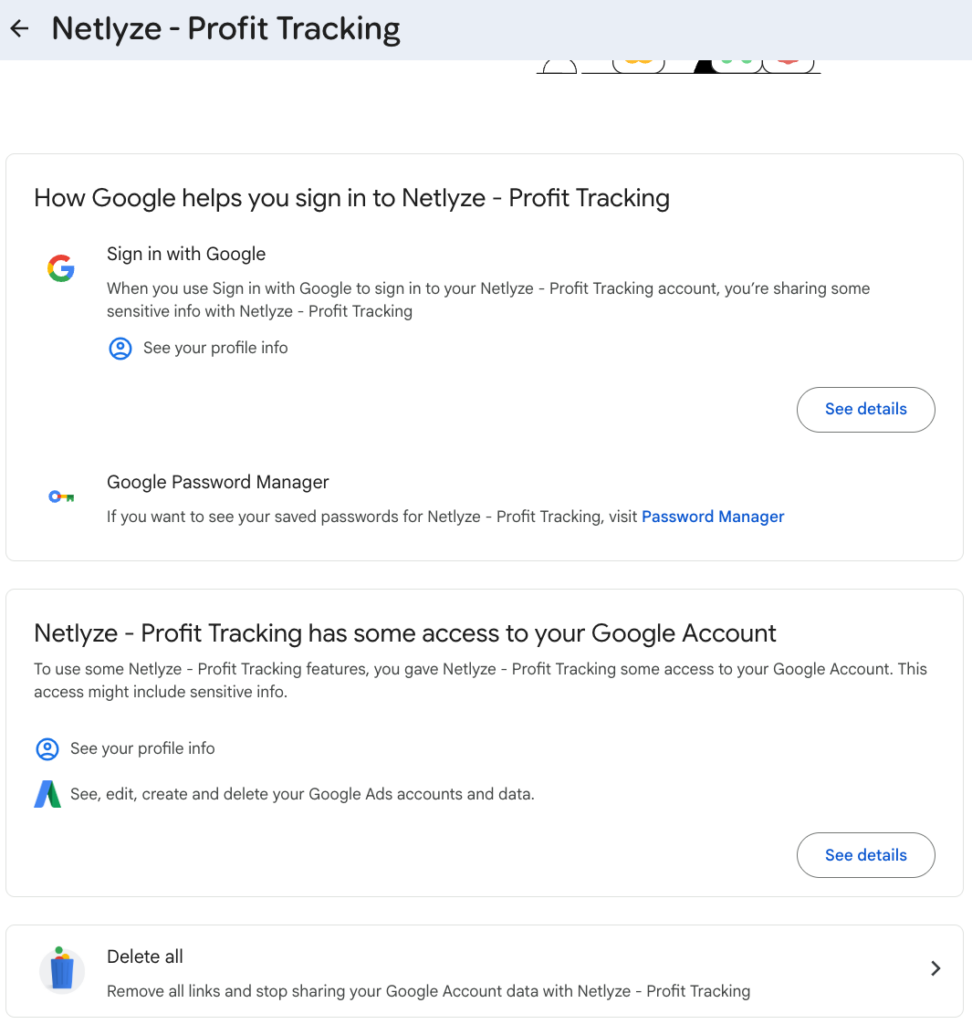
Click on it to view the permissions granted.

Step 3: Review the Permissions
You’ll see the permissions that Netlyze has access to, such as:
- Your basic profile information
- Google Ads account access
Step 4: Remove Access
Scroll to the bottom of the page and click:
Delete all
Then confirm the removal when prompted.
This will revoke all permissions previously granted to Netlyze.
Step 5: Reconnect Your Google Account
Return to Netlyze – Profit Tracking and connect your Google account again.
A fresh authorization ensures the latest permissions are granted and can resolve most Google Ads connection issues.